Thursday, December 29, 2011
Tuesday, December 27, 2011
Building L structure, part four - connections
All of my structure is built in modules. Each module connects to the next using a nut and bolt.
I try to keep each section of structure approx. three feet in length. Any longer and the sections become more difficult to assemble.
The connection is made by having one of the cross girders be .040" styrene while the next cross girder is MDF. The L section with the end cross girder of .040" styrene "slots' in next to the girder made out of MDF. Before attaching the other girders, I drill a hole in the two girders. I can then insert a nut and bolt to connect the two sections.
The below photos illustrate this modular connection.
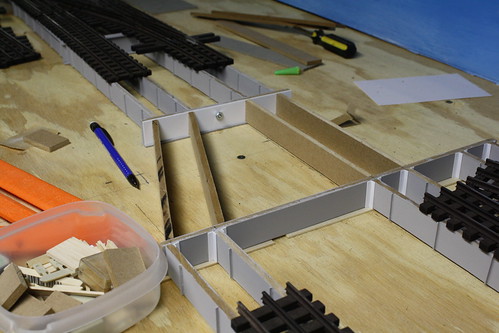
This is a connection between a two track straight section and a the begining of the island station. The track to the right curves to the right to clear the island station. The grey MDF cross girder can be seen along with the .040" cross girder of the unpainted section. A nut and bolt holds the two sections together.
This picture shows the reverse side of the above connection. The unpainted girders have been glued to the .040" styrene cross girder using super glue. Reinforcing angles will be added later. For the angled sections, .010" styrene will be cut into squares, bent to match the angle, and used as reinforcement.
Here is another picture of the connection. In this picture there are three sections of L structure. One in the foreground, one in the middle consisting of two girder spans and one in the background (the bolt is visible in the background).
I've found that this modular system works best as it allows the various sections to be built seperately and more easily. In addition, I can then remove sections from the layout as needed when working on the underlying scenery.
None of my structure is attached to my benchwork. The structure sits loosely on the "stone" foundations I make out of 1 / 4" MDF. Once the positions of the columns are determined, only those foundations are glued to the benchwork.
I try to keep each section of structure approx. three feet in length. Any longer and the sections become more difficult to assemble.
The connection is made by having one of the cross girders be .040" styrene while the next cross girder is MDF. The L section with the end cross girder of .040" styrene "slots' in next to the girder made out of MDF. Before attaching the other girders, I drill a hole in the two girders. I can then insert a nut and bolt to connect the two sections.
The below photos illustrate this modular connection.
This is a connection between a two track straight section and a the begining of the island station. The track to the right curves to the right to clear the island station. The grey MDF cross girder can be seen along with the .040" cross girder of the unpainted section. A nut and bolt holds the two sections together.
This picture shows the reverse side of the above connection. The unpainted girders have been glued to the .040" styrene cross girder using super glue. Reinforcing angles will be added later. For the angled sections, .010" styrene will be cut into squares, bent to match the angle, and used as reinforcement.
Here is another picture of the connection. In this picture there are three sections of L structure. One in the foreground, one in the middle consisting of two girder spans and one in the background (the bolt is visible in the background).
I've found that this modular system works best as it allows the various sections to be built seperately and more easily. In addition, I can then remove sections from the layout as needed when working on the underlying scenery.
None of my structure is attached to my benchwork. The structure sits loosely on the "stone" foundations I make out of 1 / 4" MDF. Once the positions of the columns are determined, only those foundations are glued to the benchwork.
Monday, December 26, 2011
Focus Stacking
Even though I use a DSLR to take pictures, I still don't get the depth of field I like.
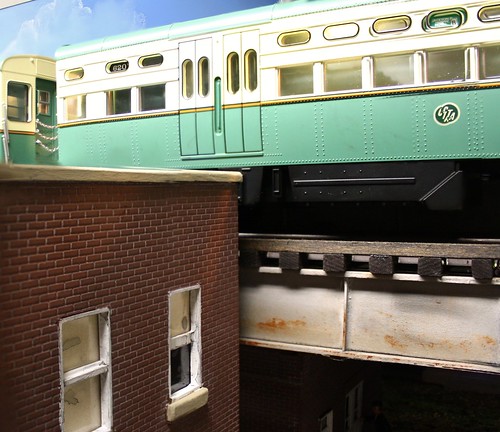
So, I've been experimenting with a program called Helicon Focus to do what is called focus stacking. You take a series of photos with different focuses, and the program combines them to give a greater sense of depth.
Some examples, each is made up of four pictures.
The program was $30 for a one year license, which is a lot cheaper than a new lens.
I've also added some dummy streetlights to my street. Painted the typical Chicago green. I'm also trying to figure out a way to add trash/garbage to my street scene. I haven't found a good solution yet.
So, I've been experimenting with a program called Helicon Focus to do what is called focus stacking. You take a series of photos with different focuses, and the program combines them to give a greater sense of depth.
Some examples, each is made up of four pictures.
The program was $30 for a one year license, which is a lot cheaper than a new lens.
I've also added some dummy streetlights to my street. Painted the typical Chicago green. I'm also trying to figure out a way to add trash/garbage to my street scene. I haven't found a good solution yet.
Saturday, December 24, 2011
Merry Christmas and safe travels to all
Merry Christmas to all and safe travels.
Waiting for the train to take me to the Christmas party. Weather is very mild in Chicago this year!
Friday, December 23, 2011
How to build L structure, part 3 - straight track
The following is how I build straight sections of structure...laying out the girders.
Each section is built in approx. three foot sections. The sections are linked together using nuts and bolts. I'll cover the exact method in a later post.
The first step is to lay out the track. The brand of track you use will dictate your track spacing. I am using Gargraves track.
In this case I am building a stub end terminal. The track on the right jogs to the right to make room for an island platform.
The stub end siding on the left is for storage.
Note - I haven't laid out any streets yet. Just the track.
My streets are made out of 1 / 4" Masonite ... from the same 2 x 4 sheets that would be used to make backdrops. Don't lay out any streets yet. Build/plan the track on the flat benchwork.
The next step is to cut the long girders. For mine, I make them 12 " (48 scale feet) long. Once cut, I add the vertical stiffeners.
By laying out the girders, you can determine where the columns will be. This helps when planning where streets will go (if they are cross streets) or where stations will go.
Note I was smart enough to pre-paint these girders before assembly. I have since stopped doing this and the structure is a bit more tedious to paint.
With the girders cut, and using the track layout as a guide, you can cut the cross girders and begin assembly.
I assemble the girders on a large, flat surface (an old shelf from a cabinet).
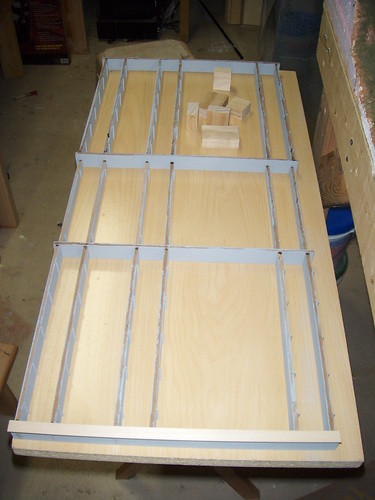
Below is a picture of the girders being assembled:
I cut some wood blocks (seen at the top of the picture) to act as spacers. It speeds construction.

In this picture I have assemble two sections: the three girder span in the foreground and a three girder span in the background. They will be connected by a two girder span in the middle. When building, I check the progress of the structure by placing it on the track to make sure that all the girders line up properly under the running rails.

Note the joint. I've added a piece of styrene angle to reinforce the joint. I added angles to each side of the girder. I strongly recommend adding these angles as it really strengthens the structure.
Each section is built in approx. three foot sections. The sections are linked together using nuts and bolts. I'll cover the exact method in a later post.
The first step is to lay out the track. The brand of track you use will dictate your track spacing. I am using Gargraves track.
In this case I am building a stub end terminal. The track on the right jogs to the right to make room for an island platform.
The stub end siding on the left is for storage.
Note - I haven't laid out any streets yet. Just the track.
My streets are made out of 1 / 4" Masonite ... from the same 2 x 4 sheets that would be used to make backdrops. Don't lay out any streets yet. Build/plan the track on the flat benchwork.
The next step is to cut the long girders. For mine, I make them 12 " (48 scale feet) long. Once cut, I add the vertical stiffeners.
By laying out the girders, you can determine where the columns will be. This helps when planning where streets will go (if they are cross streets) or where stations will go.
Note I was smart enough to pre-paint these girders before assembly. I have since stopped doing this and the structure is a bit more tedious to paint.
With the girders cut, and using the track layout as a guide, you can cut the cross girders and begin assembly.
I assemble the girders on a large, flat surface (an old shelf from a cabinet).
Below is a picture of the girders being assembled:
I cut some wood blocks (seen at the top of the picture) to act as spacers. It speeds construction.
In this picture I have assemble two sections: the three girder span in the foreground and a three girder span in the background. They will be connected by a two girder span in the middle. When building, I check the progress of the structure by placing it on the track to make sure that all the girders line up properly under the running rails.
I haven't yet added any flanges....just connecting the girders.
I use super glue to glue all the pieces together. I don't have the name of the brand I use handy, but I buy it at Hobby Lobby for $4.99. I comes in a green bottle. My next post will have more details as I'll list the tools I use.
To reinforce the joints of the girders, I glue styrene angles to the joints. This adds significant strength to the structure.
Note the joint. I've added a piece of styrene angle to reinforce the joint. I added angles to each side of the girder. I strongly recommend adding these angles as it really strengthens the structure.
In the above picture you can also see some the added detail of vertical stiffeners on the girders. In these shots you can see it is just strip styrene (.030" x .080"). I have since switched to .080" angle as the angle is a lot easier to glue on.
My layout is a shelf style layout, so the structure can only be seen from one side. Therefore, I cheated and detailed only one side of the structure with the vertical stiffeners since you can't see the back side .... laziness on my part.
My next post will cover how I connect all the sections together and add some flanges to the girders. Where you decide to place your columns will dictate how you place your flanges so I'll cover that in a later post.
Note also that I haven't yet attached any columns. That will be covered in a later post also. The height of the columns depends on your eventual scenery plans and I'll show some of the considerations to take into account when planning that.
O Scale Cabrini Green Housing Projects
One iconic / infamous set of buildings on Chicago's near north side were the Cabrini Green housing projects. The Ravenswood ran along side the projects and the projects were featured in the opening credits to the TV's hit TV show "Good Times".
With this, I felt I had to have at least one of the classic Cabrini Green projects on my layout. It is a part of Chicago's history ... since they have been torn down.
The original:
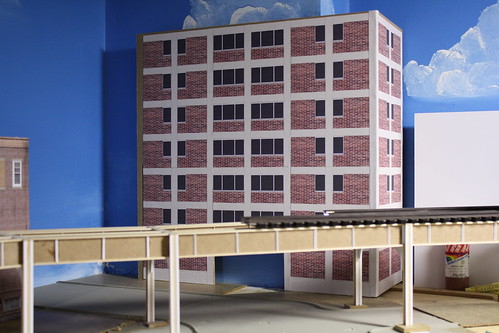
My version, still under construction, is made of 1 / 4" MDF (very versatile!) covered in paper. The building images were made using Evan's Designs Model Maker building with textures obtained from cgtextures.com.
Model Builder isn't the best program, but it gets the job done. Eventually I will add a recessed entry way (the large hole at the base), some additional textures for molding around the top and add some scenery around the base. In front of the L tracks I plan on putting an urban park consisting of a basketball court.
With this, I felt I had to have at least one of the classic Cabrini Green projects on my layout. It is a part of Chicago's history ... since they have been torn down.
The original:
My version, still under construction, is made of 1 / 4" MDF (very versatile!) covered in paper. The building images were made using Evan's Designs Model Maker building with textures obtained from cgtextures.com.
Model Builder isn't the best program, but it gets the job done. Eventually I will add a recessed entry way (the large hole at the base), some additional textures for molding around the top and add some scenery around the base. In front of the L tracks I plan on putting an urban park consisting of a basketball court.
Examples of different MDF Thickness
As mentioned in the materials post, I have switched from using Home Depot 1 / 4" thick MDF to 1 / 8" thick MDF.
The below section was built with 1 / 8" MDF:
This section was build with 1 / 4" MDF:
Not a gigantic difference, but the 1 / 8" is a little less beefy. I haven't noticed a significant lack of strength with the 1 / 8" structure.
Subscribe to:
Posts (Atom)